Thank you! Your submission has been received!
Oops! Something went wrong while submitting the form.
By signing up for your free account, you agree to receive e-mails from Triggre.
By signing up for your free account, you agree to receive e-mails from Triggre.

Most organizations already have the answers they need. They're stored in manuals, knowledge bases, procedures, websites, and internal documents. The challenge is finding the right information quickly and consistently.
Whether you're supporting customers, onboarding employees, or running a service desk, teams often spend valuable time searching for information and answering the same questions repeatedly.
The Documentation Querying blueprint helps solve this problem by turning existing documentation into a growing knowledge system powered by AI and human review.
As organizations grow, knowledge becomes harder to access.
Information is spread across different systems, maintained by different teams, and stored in different formats. As a result, employees spend time searching for answers instead of using them.
This leads to:
The blueprint creates a structured process for handling incoming questions. It uses your existing documentation to generate answers, while ensuring every new answer is reviewed before becoming part of the knowledge base.
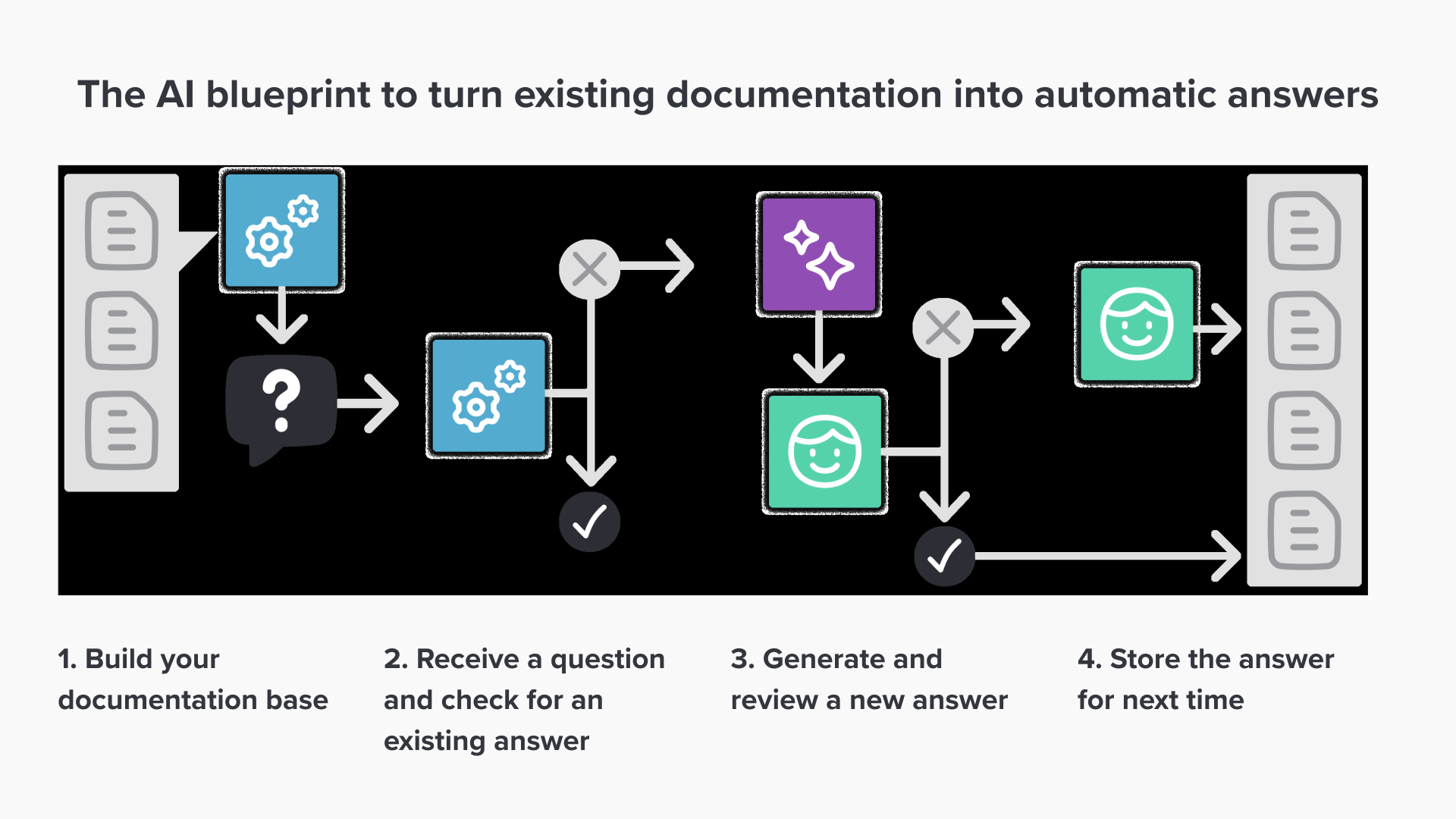
1. Build your documentation base
Collect the documents that contain relevant knowledge, such as manuals, policies, procedures, knowledge articles, and web content. The information does not need to be perfectly structured. AI can work with unstructured content from multiple sources.
2. Check for an existing answer
When a question arrives, the process first searches for a previously approved answer. If a match is found, the answer is returned immediately without any manual effort.
3. Generate and review a new answer
If no answer exists, AI generates a response based on the available documentation. A human reviewer validates the answer and makes corrections if needed before approving it.
4. Store the answer for future use
Once approved, the answer is stored in a centralized knowledge library. The next time a similar question is asked, the process can respond automatically.
The Documentation Querying blueprint can be used anywhere people rely on documented knowledge to answer questions.
Many organizations answer the same questions again and again. The Documentation Querying blueprint ensures that every approved answer becomes a reusable asset. As the knowledge library grows, more questions can be answered automatically, reducing effort while improving consistency and response times.