


Thank you! Your submission has been received!
Oops! Something went wrong while submitting the form.
By signing up for your free account, you agree to receive e-mails from Triggre.
By signing up for your free account, you agree to receive e-mails from Triggre.

If you work in operations, this probably sounds familiar.
An email arrives. A PDF lands in your inbox. A form is submitted. You open it, copy the relevant details, paste them into another system, check whether the totals make sense, fix a small mistake, and move on.
Then you do it again.
It doesn’t matter whether you’re in support, HR, or purchasing. The context changes. The repetitive data handling does not.
Behind most operational work sits the same structure.

Strip away the department labels and you’ll see the same flow almost everywhere:
This is not theory — it’s how support desks process tickets, how recruiters process CVs, and how finance teams process invoices. Once you recognize this pattern, automation becomes much more practical.
The document data extraction blueprint describes this clearly: extract data from documents, check if it is complete and correct, correct where needed, then use the information in downstream business processes.
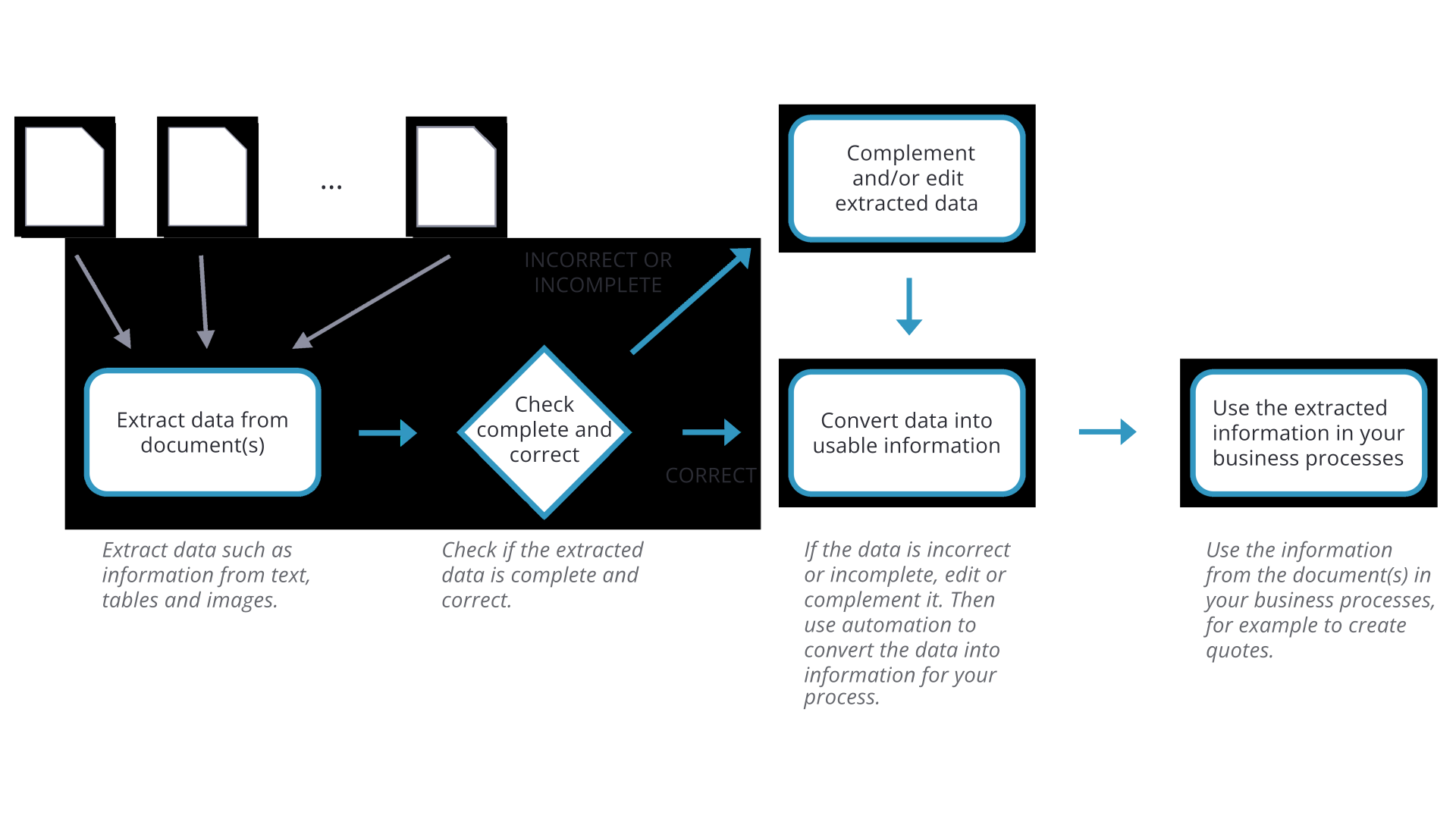
A support email comes in.
Someone — or something — needs to identify the customer, the issue, and the urgency. That information is checked for completeness and consistency. If something is missing, an agent corrects it. Once the data is structured and reliable, the ticket moves into the service management workflow.
The value is not in copying text from an email into a ticketing system, but in solving the issue.
A CV arrives as a PDF.
Experience, skills, and certifications are captured and structured. The recruiter checks whether the profile matches the role requirements. If something is unclear, they adjust or interpret it. Then the candidate flows into a scoring, matching, or interview workflow.
Again, the real work is not retyping career histories but evaluating potential.
An invoice or purchase order is received.
Line items, quantities, and totals are extracted. Subtotals are recalculated and compared. If numbers don’t match, someone investigates and corrects the data. Once validated, the ERP, stock, and approval workflows are updated.
If you want to use AI in operations, start with the repetitive steps where unstructured data is handled.
AI-powered data extraction and intelligent document processing can structure information from emails, PDFs, and forms. Validation logic can automatically recalculate totals and compare values. Workflow automation can push clean data into ERP, HR, or service systems without manual re-entry.
What remains for humans are the exceptions and edge cases — the situations that require judgment. That’s where people add real value.
Pick one process in your department.
Ask yourself:
Map those steps to the four-part pattern: extract, validate, fix, push.
In many organizations, the biggest gains in operational efficiency are hidden in these repetitive transitions between systems.
Business process automation today starts with recognizing the pattern, and redesigning it with AI and human-in-the-loop thinking in mind.


